
配置大模型服务
文策 AI 需要连接支持工具调用的 LLM 服务。API Key、Base URL 和模型配置保存在本机,不会上传到文策 AI 的服务器。
服务商示例
| 服务商 | 模型示例 | 获取地址 |
|---|---|---|
| DeepSeek 官方 | DeepSeek V4 Pro | platform.deepseek.com |
| 阿里云百炼 | Qwen 3.6 Plus | bailian.console.aliyun.com |
| OpenRouter | 多种 OpenAI 兼容模型 | openrouter.ai |
模型必须支持 Tool Calling。不同服务商展示的模型名称和模型 ID 可能不同,请以服务商控制台和“获取模型列表”的实际结果为准。
使用 DeepSeek V4 Pro 配置
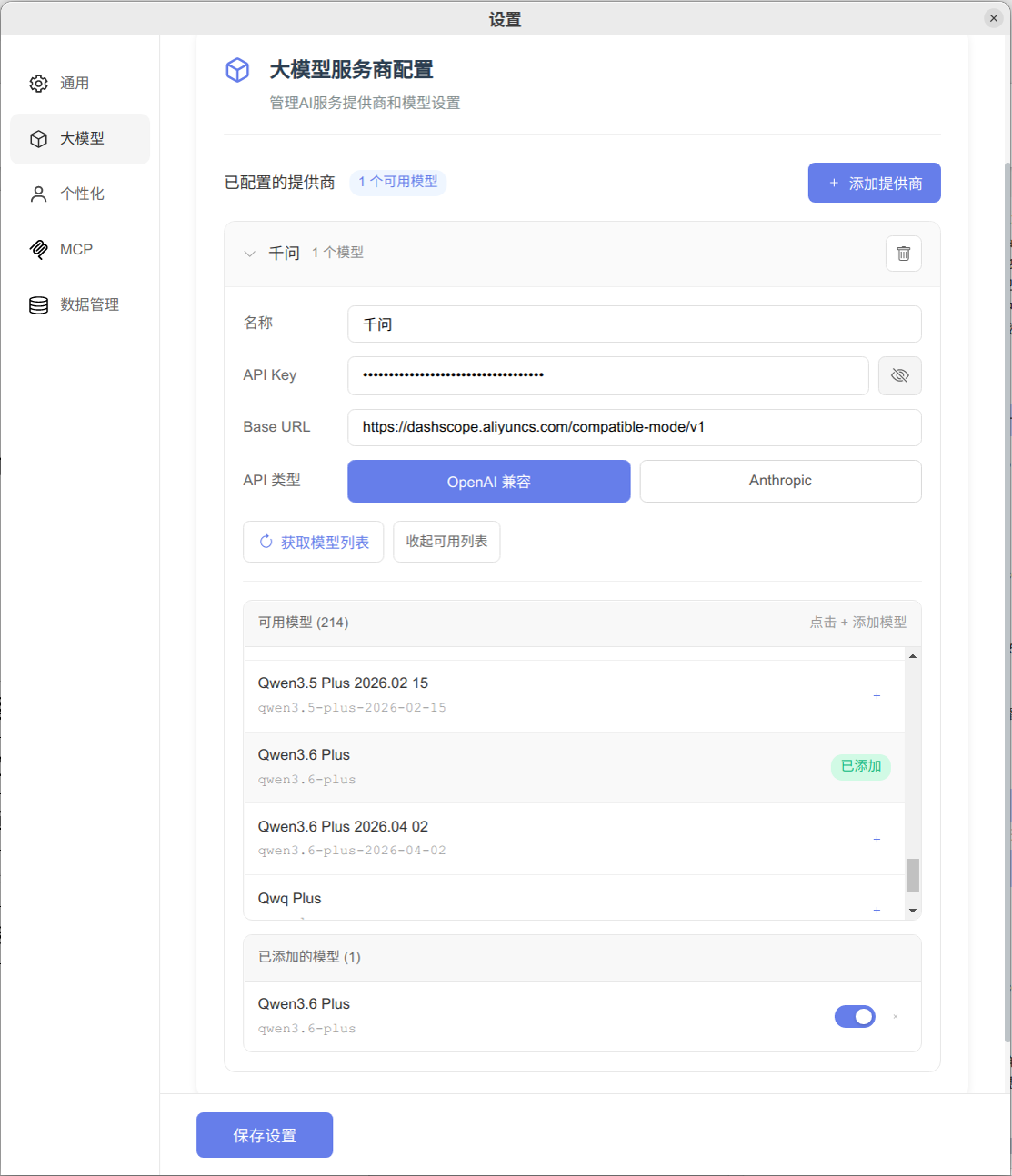
以下以 DeepSeek 官方 API 提供的 DeepSeek V4 Pro 为例:
- 启动文策 AI 后端,并在 WPS Word 或 Microsoft Word 中打开文策 AI 面板。
- 点击 设置 → 大模型 → 添加提供商。
- 填写提供商配置:
- 名称:
DeepSeek - API Key:填写从 DeepSeek 官方平台 获取的密钥
- Base URL:
https://api.deepseek.com - API 类型:选择 OpenAI 兼容
- 名称:
- 点击 获取模型列表。
- 在返回的模型中找到 DeepSeek V4 Pro,点击添加并打开启用开关。
- 点击页面底部的 保存设置。
- 返回聊天页,在模型下拉列表中选择
DeepSeek / DeepSeek V4 Pro。
使用官方接口
请从 DeepSeek 官方平台创建 API Key,并使用官方 Base URL https://api.deepseek.com。不需要配置第三方中转服务。
配置其他模型
其他 OpenAI 兼容服务商使用相同步骤,只需替换名称、API Key、Base URL 和模型。Claude 原生接口请选择 Anthropic API 类型;DeepSeek 官方、Qwen 及其他 OpenAI 兼容接口选择 OpenAI 兼容。
编辑 LLM 模型参数
在 设置 → 大模型 中展开提供商,点击“已添加模型”右侧的齿轮按钮,即可编辑该模型的参数。编辑窗口在当前设置页内打开,背景会变灰;关闭后恢复原来的界面。
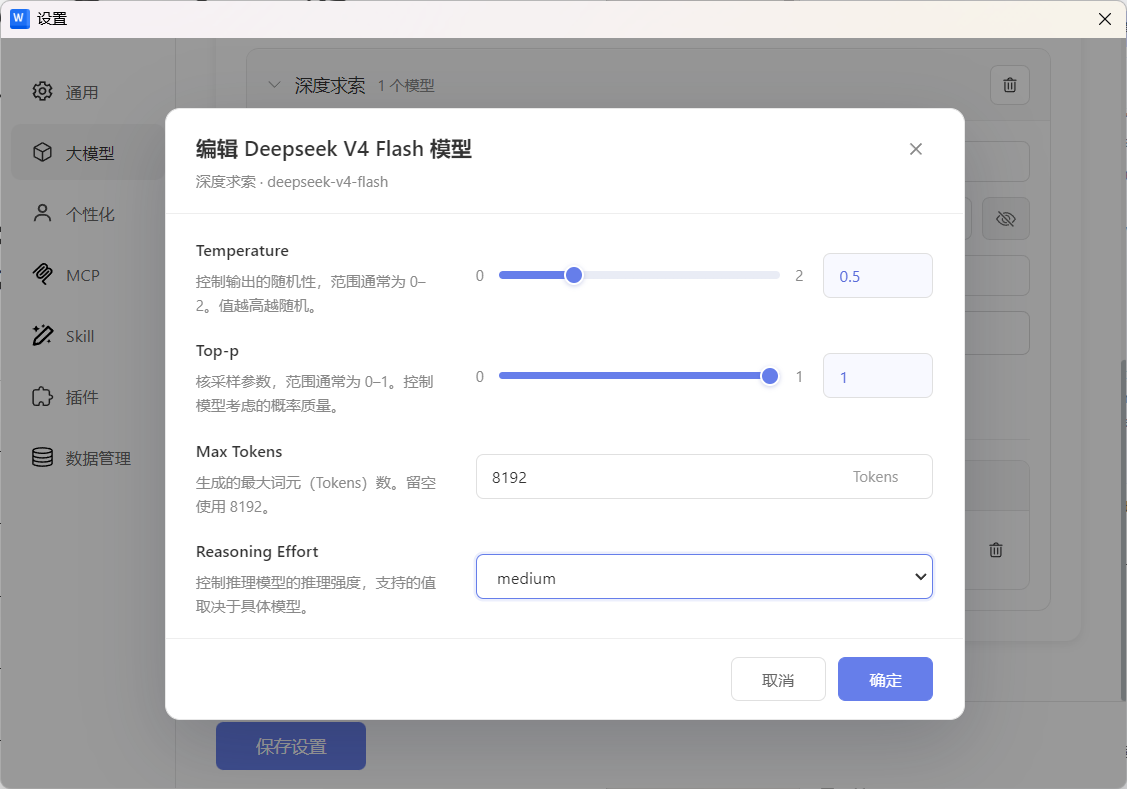
| 参数 | 默认值 | 说明 |
|---|---|---|
| Temperature | 0.5 | 控制输出的随机性,范围为 0–2;值越高越随机。可拖动滑条,也可输入数值。 |
| Top-p | 1 | 核采样参数,范围为 0–1,控制模型考虑的概率质量。可拖动滑条,也可输入数值。 |
| Max Tokens | 8192 | 单次生成的最大输出 Token 数,需为正整数;留空使用 8192。 |
| Reasoning Effort | medium | 控制推理强度,可选 none、minimal、low、medium、high、xhigh。具体支持的值取决于模型。 |
修改后先点击弹窗中的 确定,再点击设置页底部的 保存设置。取消、右上角关闭按钮或 Esc 会放弃本次弹窗中尚未确认的修改。
参数按“提供商 + 模型”分别保存。内置 Agent / Ask 对话使用当前所选模型的参数,切换模型后使用对应配置。Temperature 已移到此处,个性化页面只管理全局提示词;当前不提供模型上下文窗口大小设置。
聊天输入区的“允许思考”开关已移除,推理由 Reasoning Effort 控制。选择 none 时,后端会按模型接口的适配规则请求关闭推理;仅支持固定推理模式的模型可能不接受此值。部分推理模型也会限制 Temperature / Top-p,实际生效参数以模型支持情况为准。
配置后没有模型
- 确认 API Key 和 Base URL 没有多余空格。
- 确认 Base URL 是 API 地址,而不是服务商网站首页。
- 点击 获取模型列表 后,还需要将模型添加到“已添加模型”并启用。
- 保存设置后返回聊天页刷新模型列表。
- 如果服务商不支持模型列表接口,请确认其兼容协议和接口文档。